
Square Golf Omni vs Rapsodo MLM2PRO
These two work in very different ways. The Omni is a side-on, four-camera unit with club data and putting, at about £1,600. The MLM2PRO is a rear-mounted radar-and-camera unit with swing video, at about £549 plus an optional Premium plan.
Published 27 September 2026 and updated 9 November 2026. Specifications are the manufacturers' published figures; UK prices are from approved retailer listings checked 9 November 2026 and can change.
Quick verdict
Choose it if your room is short, you want club data (path, face, attack angle, impact location) and putting, and you would rather not pay an ongoing subscription.
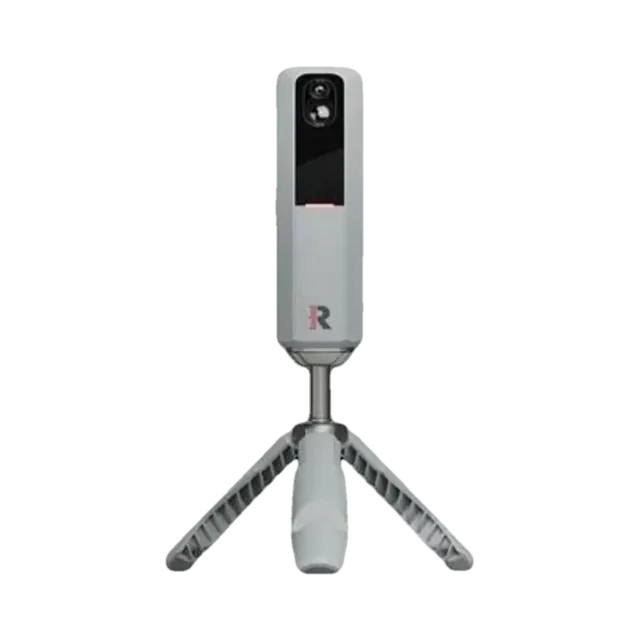
Choose it if budget comes first, you want automatic swing video, and you have at least 14 ft of depth or mostly practise outdoors.
Full comparison below. We may earn a commission if you buy through “Check prices”, at no extra cost to you. How our links work.
Side by side
| Decision point | Square Golf Omni | MLM2PRO |
|---|---|---|
| Typical price | £1,500–£1,600 | Around £549 |
| Tracking | Four high-speed infrared cameras | Doppler radar + two cameras |
| Placement | Beside the ball on a tripod | 6.5–8.5 ft behind the ball |
| Club data | Face to target, path, attack angle, dynamic loft, impact location, club speed (20 club stickers included) | Limited — mainly ball data and video |
| Putting | Supported | Not the focus |
| Video | Not the focus | Automatic swing and impact video |
| Subscription | No mandatory subscription; built-in simulator and welcome credits | Premium £165.99 a year or £499.99 lifetime for full features |
| Third-party software | GSPro, E6 Connect, Awesome Golf | GSPro, E6 Connect, Awesome Golf |
| Indoor / outdoor | Both (mat or grass) | Both; RPT balls for spin indoors |
| Golf Gear Lab status | Evidence-led assessment | Scored 88/100 |
Golf Gear Lab verdict
Choose the Square Golf Omni for a short indoor room with club data and no mandatory subscription; paid course credits apply. Choose the MLM2PRO for lower cost, swing video and outdoor practice.
Check current UK prices
Each button opens our retailer page for that exact model, showing the approved UK retailers that currently list it. You choose where to buy.
Check Square Golf Omni pricesCheck MLM2PRO pricesCheck original Square Golf pricesWe may earn a commission if you buy through these links, at no extra cost to you. Retailer order does not change our verdict.
Square Golf Omni or MLM2PRO: the practical answer
In a short UK garage or spare room the Omni is the stronger simulator choice. For a lower budget, outdoor practice and swing video, the MLM2PRO is the better buy.
Placement changes everything indoors
The Omni sits beside the ball, so it does not need space behind the golfer. The MLM2PRO needs 6.5–8.5 ft behind the ball plus 8 ft to the net, which is just over 14 ft before any swing clearance. Many UK single garages cannot do that comfortably with a screen in place.
What the Omni adds
Square Golf says the Omni moves up from one or two cameras on the original model to four. It adds outdoor use, club data from stickers (20 are included) and putting. Some reviewers note that face angle and dynamic loft are partly estimated. There is no mandatory subscription, and it works with GSPro, E6 Connect and Awesome Golf.
What the MLM2PRO does better
Price and video. At about £549 it costs roughly a third of the Omni, and its automatic swing and impact clips help if you practise on your own. Add £499.99 for lifetime Premium and it is still about £550 cheaper than the Omni.
Frequently asked questions
Is Square Golf Omni better than the Rapsodo MLM2PRO?
For a short indoor room, often yes: it sits beside the ball, adds club data and putting, and has no mandatory subscription. The MLM2PRO is much cheaper and offers swing video, so it suits tighter budgets and outdoor practice.
How much room does each need?
The Omni sits side-on, so depth is set by your swing and screen. The MLM2PRO needs 6.5–8.5 ft behind the ball plus 8 ft to the net.
Does the Omni need a subscription?
Square Golf states there is no mandatory subscription. The built-in simulator comes with welcome credits; virtual-course play uses paid credits after that allowance, and third-party software is sold separately.
What is the difference between Square Golf and Square Golf Omni?
According to Square Golf, the Omni has four cameras instead of one or two, works outdoors as well as indoors, and needs no marked balls. It costs more than twice as much as the original.
Related reading
Checklist before you choose
The comparison above covers the main differences. Use these checks on your own room, round and budget before ordering.
- Which is better for your practice space?
- What data and feedback does each provide?
- What software or subscriptions are needed?
- What accessories or extra hardware will you need?
- Which works better indoors, outdoors or in a garage?
- What is the realistic first-year and longer-term ownership cost?
- What compromise would make you choose the other model?
What to compare before you choose
| Decision factor | What Golf Gear Lab checks |
|---|---|
| UK price today | Each product card above shows our typical price and the UK retailers we link to. Check the final price with the retailer. |
| Room fit | Check device placement, ball flight and total room depth before buying. |
| Data & feedback | Compare the measurements and practice feedback you will actually use. |
| Software & subscriptions | Include required apps, memberships and simulator software in the decision. |
| Extra equipment | Allow for a phone/tablet, PC, projector, mat, net or screen where applicable. |
| Ownership cost | Compare purchase price plus required extras and recurring costs, not headline price alone. |
| Where it works best | Decide whether your priority is garage, garden room, range, outdoor practice or a full simulator. |
Where live UK retailer data is available, use it for the current-price decision. Recurring or ownership costs are shown only where they materially affect the choice and can be supported reliably.
How we made this comparison
We compare the products against the buying decision on this page, including their intended use, practical setup, ownership costs, current market position and the specifications that can materially change the choice. We cross-check manufacturer claims against independent published testing and practical owner experience where useful, and distinguish published specifications from independently observed findings.
Compare the cost of ownership before buying
Start with the current hardware price, then add three years of any required membership, simulator software, compatible phone or computer, and the room equipment you need. A lower device price does not necessarily mean a lower complete-system cost.
Check which measurements and course-play features work without a subscription, whether the first year is included, and what happens when membership expires. For a simulator, allow separately for the net or screen, mat, projector and safe swing clearance. Confirm compatibility with the exact device and software version before ordering.
Choose the device whose measured data and everyday workflow fit your use: outdoor practice, indoor simulation or on-course distances. Use the full product reviews linked above for the detailed trade-offs, and check the retailer’s returns and warranty terms before committing.